AI visibility for the enterprise

See every AI tool, agent, model, prompt and dollar.

One view of all AI use, sanctioned and unsanctioned, by people and by agents: who uses which AI, what class of data goes to it, how many tokens it takes and what it costs. Built on the cloud AI APIs, DLP and gateways you already run. Prompts stay on the device.

  • Metadata-only by default
  • Tenant-isolated
  • Built for DPDP & GDPR

Every AI source in, one view out

Every source you already run

  • Cloud AI provider APIs: OpenAI · Claude · Bedrock · Azure · Vertex. Tokens and billed cost.
  • Endpoint DLP platforms: FortiDLP · Zscaler · Forcepoint · Symantec. What data moved.
  • Local AI gateways: LiteLLM · Bifrost · agentgateway. Exact tokens, tool calls.
  • Self-hosted models: OpenTelemetry GenAI · vLLM · Ollama. Internal model use.
  • Firewall telemetry: Unmanaged and BYOD devices. Where no agent runs. Coming soon.
AI usage · every sourceLast 30 days

Normalized · attributed to people, teams and devices · measured

$48.2KBilled AI spend
1.2BTokens · exact
38AI tools in use
6Unsanctioned

Daily tokens by where they were seen

Cloud APIs Gateways Self-hosted

Top models by tokens

  • gpt-4o412M
  • claude-sonnet-4-5338M
  • llama-3.3-70b · self-hosted121M

Data by destination · from DLP

  • Source code → ChatGPT14 eventspersonal account
  • Customer PII → DeepSeek3 eventsunsanctioned

Illustrative · demonstration data

Recognises traffic to
  • ChatGPT
  • Claude
  • Gemini
  • Copilot
  • Perplexity
  • DeepSeek
  • Mistral
  • Meta AI
  • Qwen
  • Grok
  • Ollama, self-hosted
  • MCP tool servers

See it work

Ten seconds inside the product, on demonstration data.

The problem

AI adoption moved faster than your visibility.

  1. 01

    Shadow AI in the browser

    People paste source code, customer records and contracts into public AI tools to get work done. Your DLP may fire, but its alert doesn't say which AI tool it was, whether that tool is sanctioned, or which team keeps doing it.

  2. 02

    Agents with tool access

    Orchestrator models now call external tools over MCP on their own. Nobody inventoried those servers, and nothing records which tool received what class of data.

  3. 03

    Internal models, no audit trail

    Self-hosted models run behind gateways security can't see into. You can't say who calls them, with what data, or how many tokens they use.

“Your DLP raises an alert. It doesn't tell you the AI story.”

How it works

Many signals in. One answer out.

Oqulix doesn't ask you to rip anything out. It reads the collection points you already trust, turns each signal into one AI event, and shows every event in the same place.

Collection paths

DLP connectorsFortiDLP today; a connector framework for the rest
LLM & MCP gatewaysProxies your teams already route through
OpenTelemetryGenAI spans from internal model stacks
Windows agentAI-bound traffic only. No TLS interception
AI vendor usage APIsClaude, OpenAI, Bedrock, Azure OpenAI, Vertex AI

Oqulix pipeline

01
NormaliseOne event schema, whatever the source
02
ClassifyData class on the device; only the label travels
03
AttributePerson, department, device, sanctioned or not
04
MeasureExact tokens and billed cost, never mixed with estimates

Who it serves

CISOUnsanctioned AI, data on the AI path
CIOAdoption, usage, cost, ROI
AnalystInvestigate any event
Your existing DLPEnforcement stays where it is
  • Public AI providers
  • Self-hosted & private models
  • Agents & MCP tool calls

The platform

From first prompt to board report, in four moves.

  1. 01 See
  2. 02 Understand
  3. 03 Measure
  4. 04 Optimize

01 See

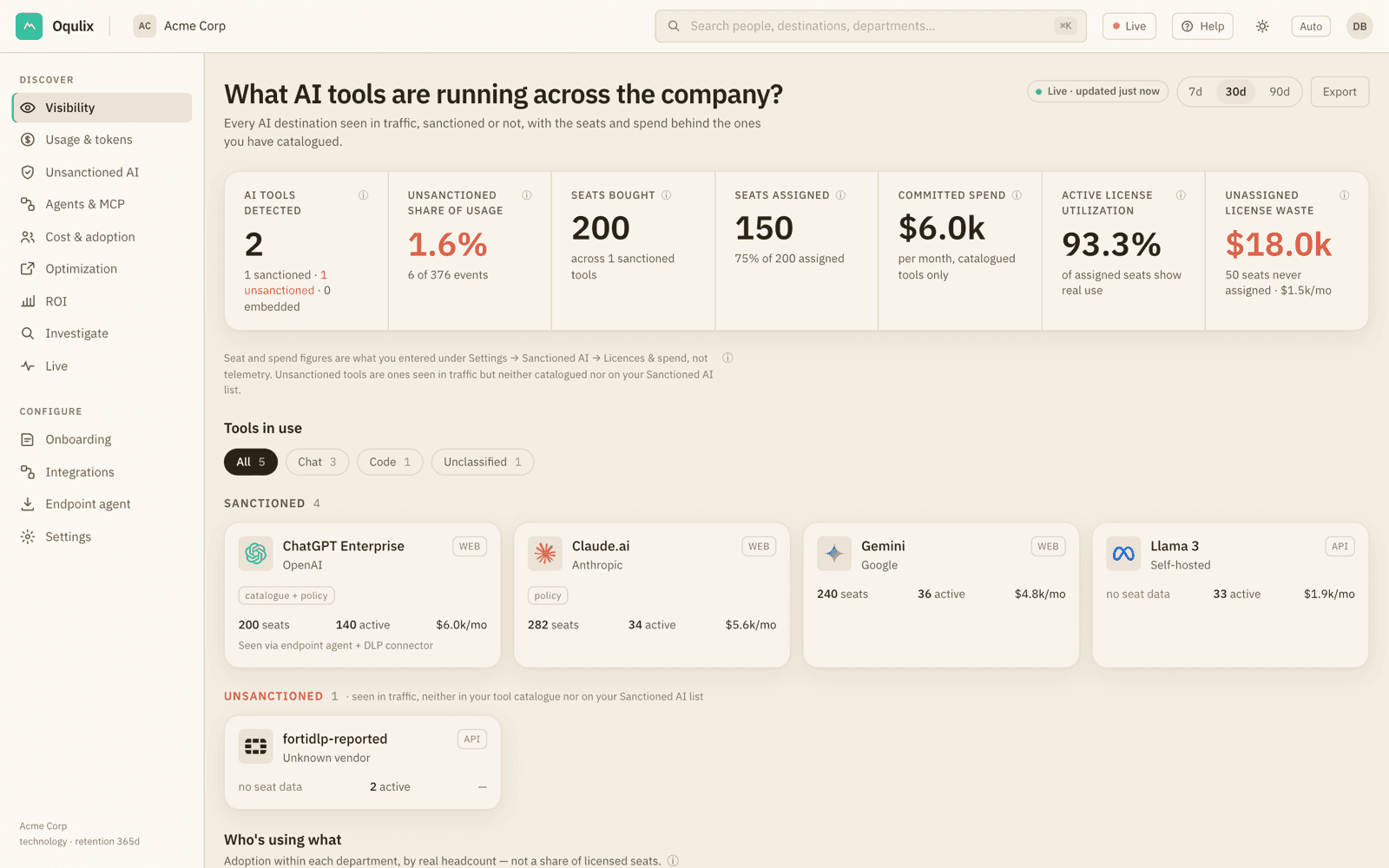
Every AI destination, in one inventory.

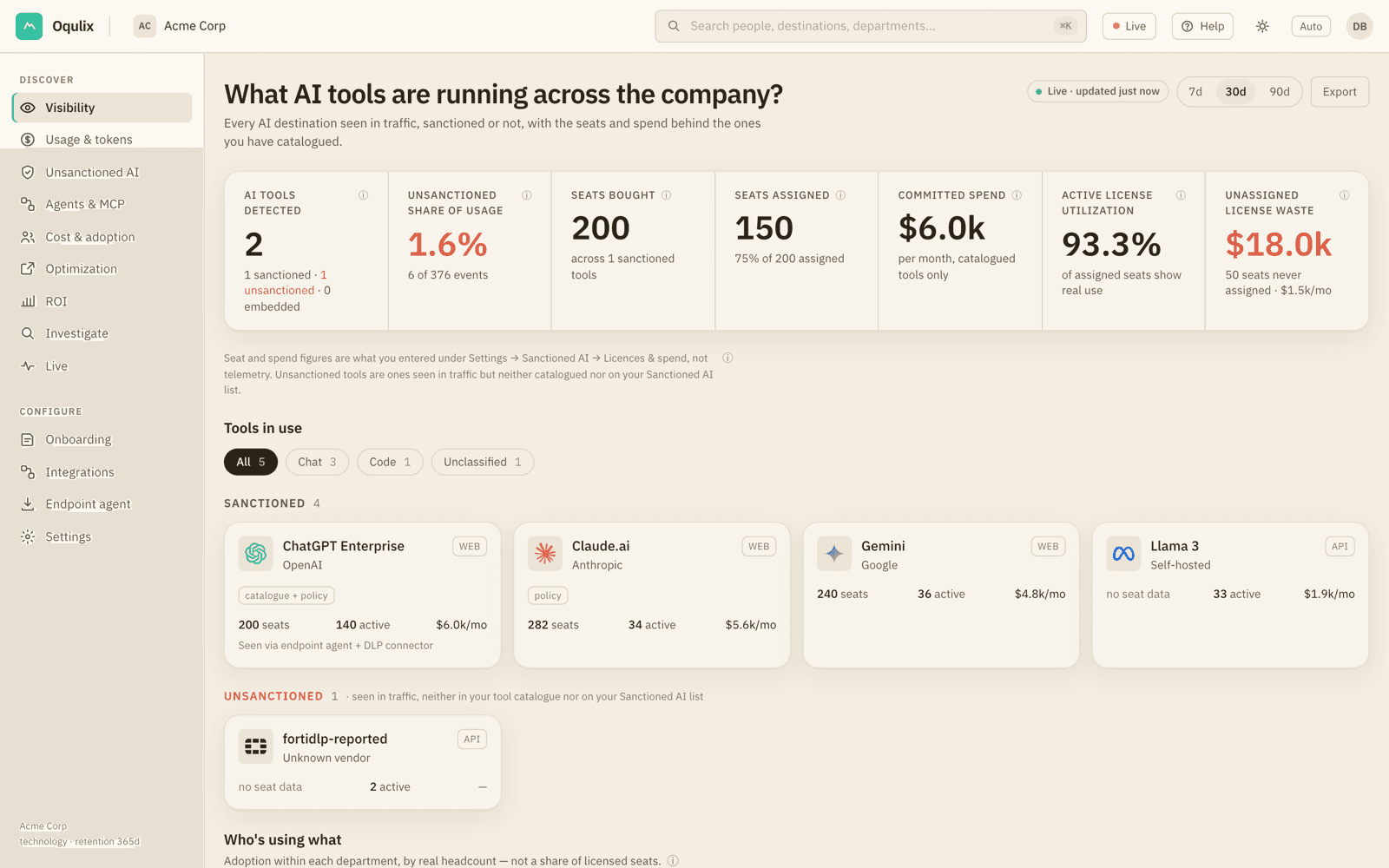
Sanctioned or not, public or self-hosted, typed by a person or called by an agent: every destination shows up with the people, departments and data classes behind it.

  • Unsanctioned AI found from real traffic, not surveys
  • Public, private and agentic traffic, each colour-coded
  • Every figure drills down to the events behind it
The Visibility page: AI tools detected, unsanctioned share of usage, seats and spend, and each tool with its active users.

02 Understand

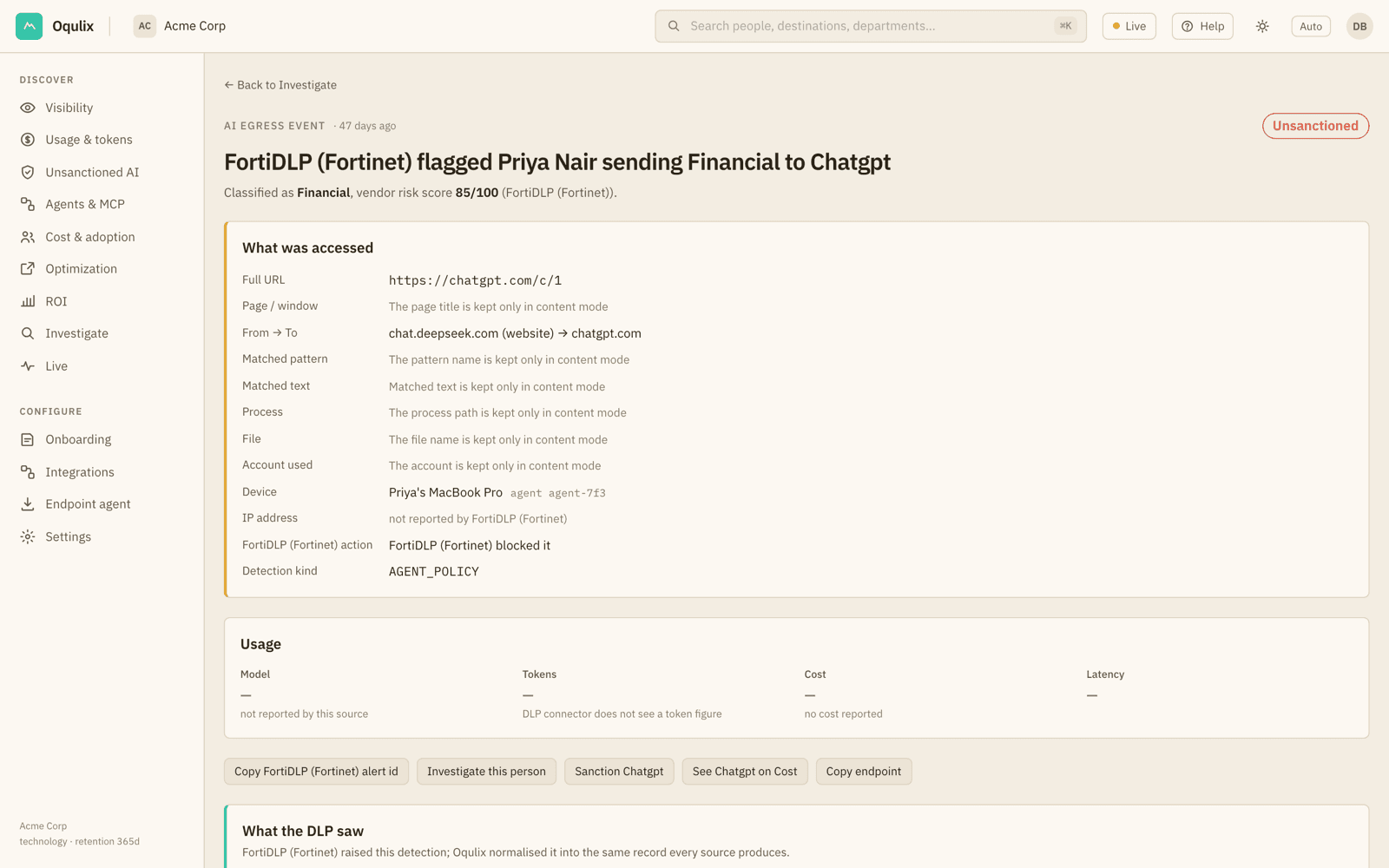
Every event, in plain language.

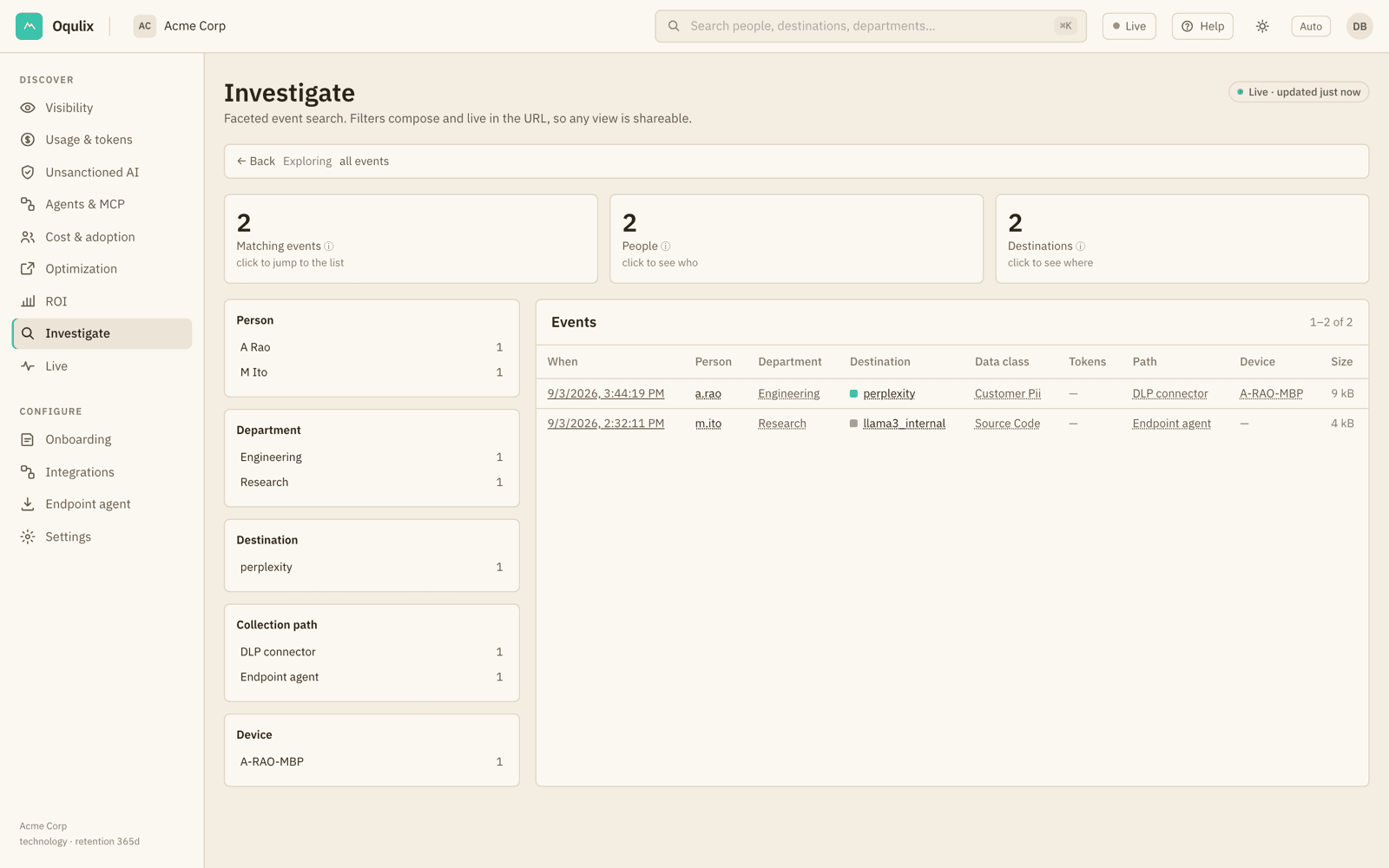
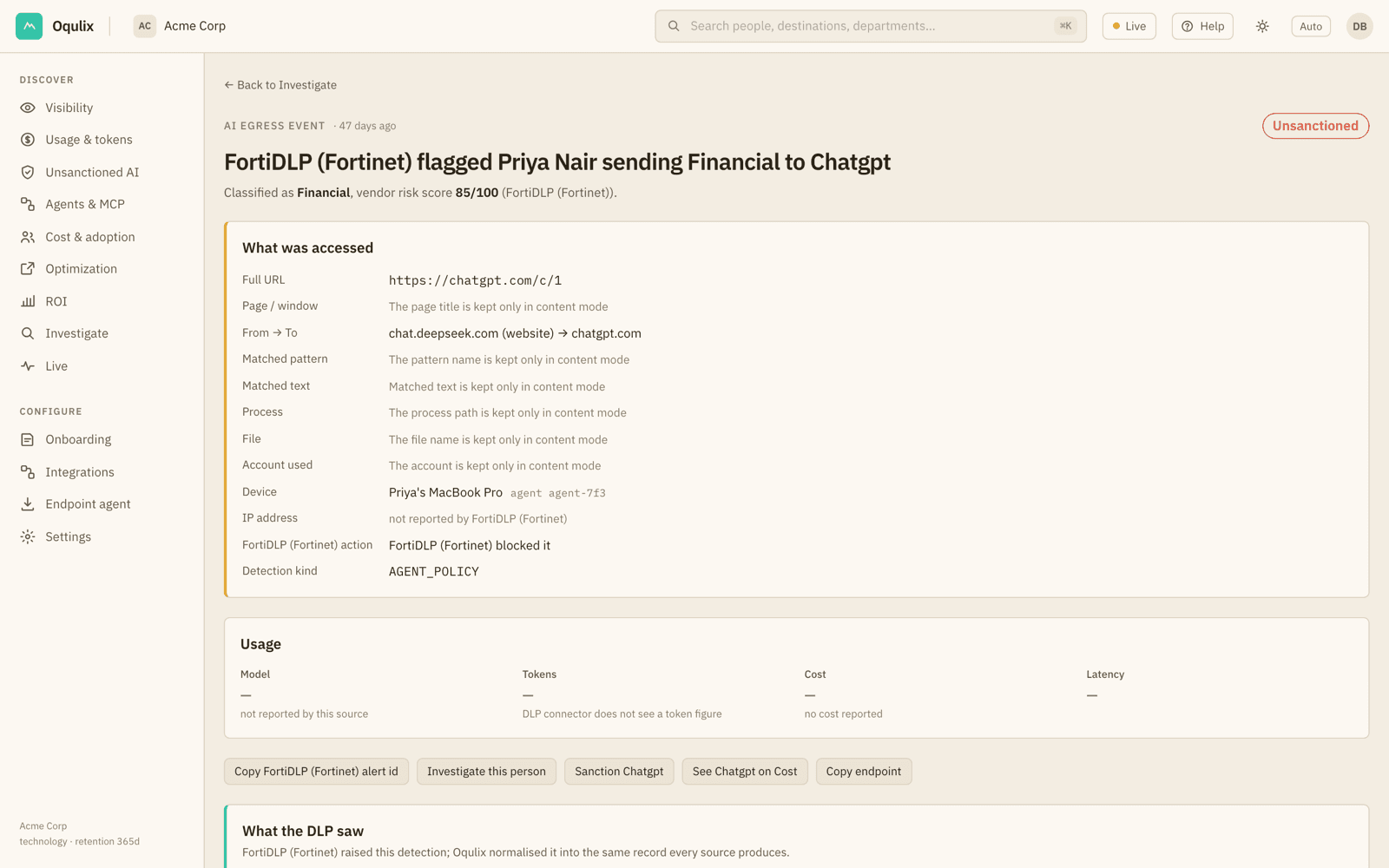
Open any event to see who used which AI tool, when, what class of data your DLP reported, the device it came from, and what the DLP itself did. The text itself stays out unless your organisation switches content mode on.

  • Who sent which data class to which tool, and when
  • The device and the DLP's own action, as reported
  • Content only in opt-in content mode, every read audited
An event page: a DLP detection of a person sending data to ChatGPT, with what was accessed, the device, the DLP's own action, and who, when, where and how much.

03 Measure

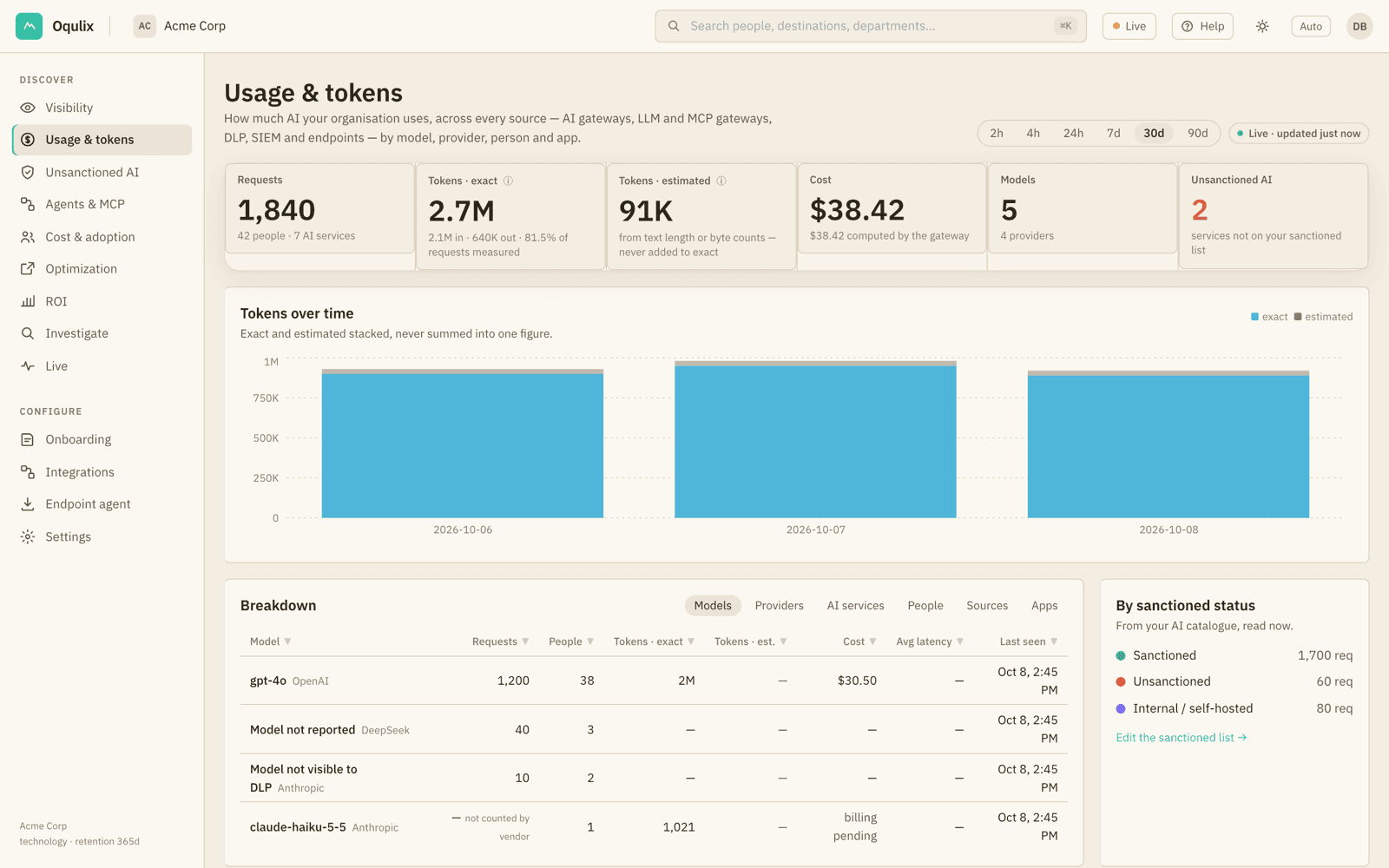
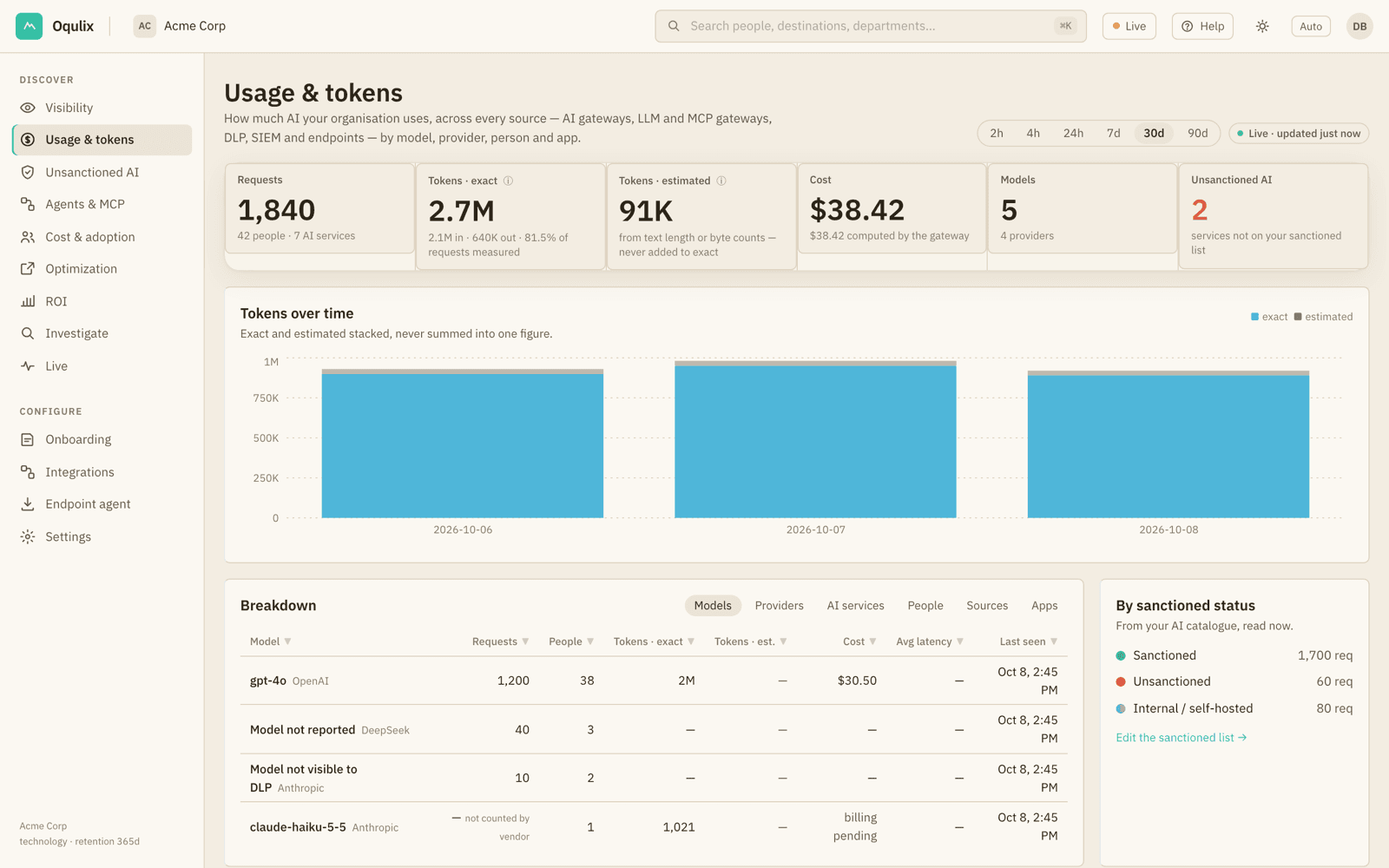
Tokens and cost, from every source.

Gateways, endpoints, DLP and the AI vendors' own usage APIs land in one view, by model, provider, person and app. Exact tokens and estimates are never added together, and cost is the vendor's billed figure, never a list price.

  • Exact and estimated tokens, always kept apart
  • Claude and OpenAI usage within about a minute
  • By person, department, model and source
The Usage & tokens page: requests, exact and estimated tokens kept apart, cost with its basis, and a breakdown by model, provider, person and source.

04 Optimize

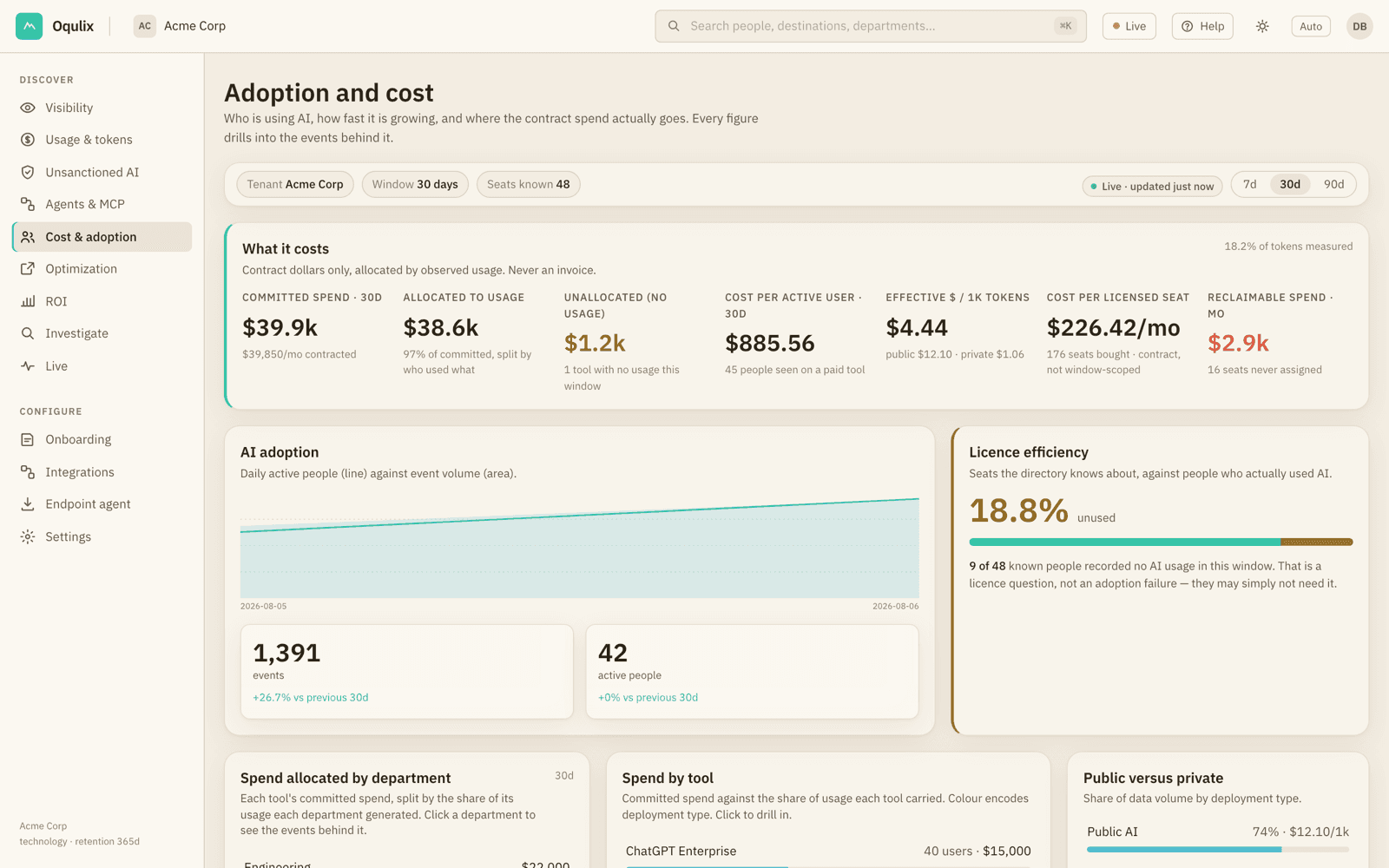
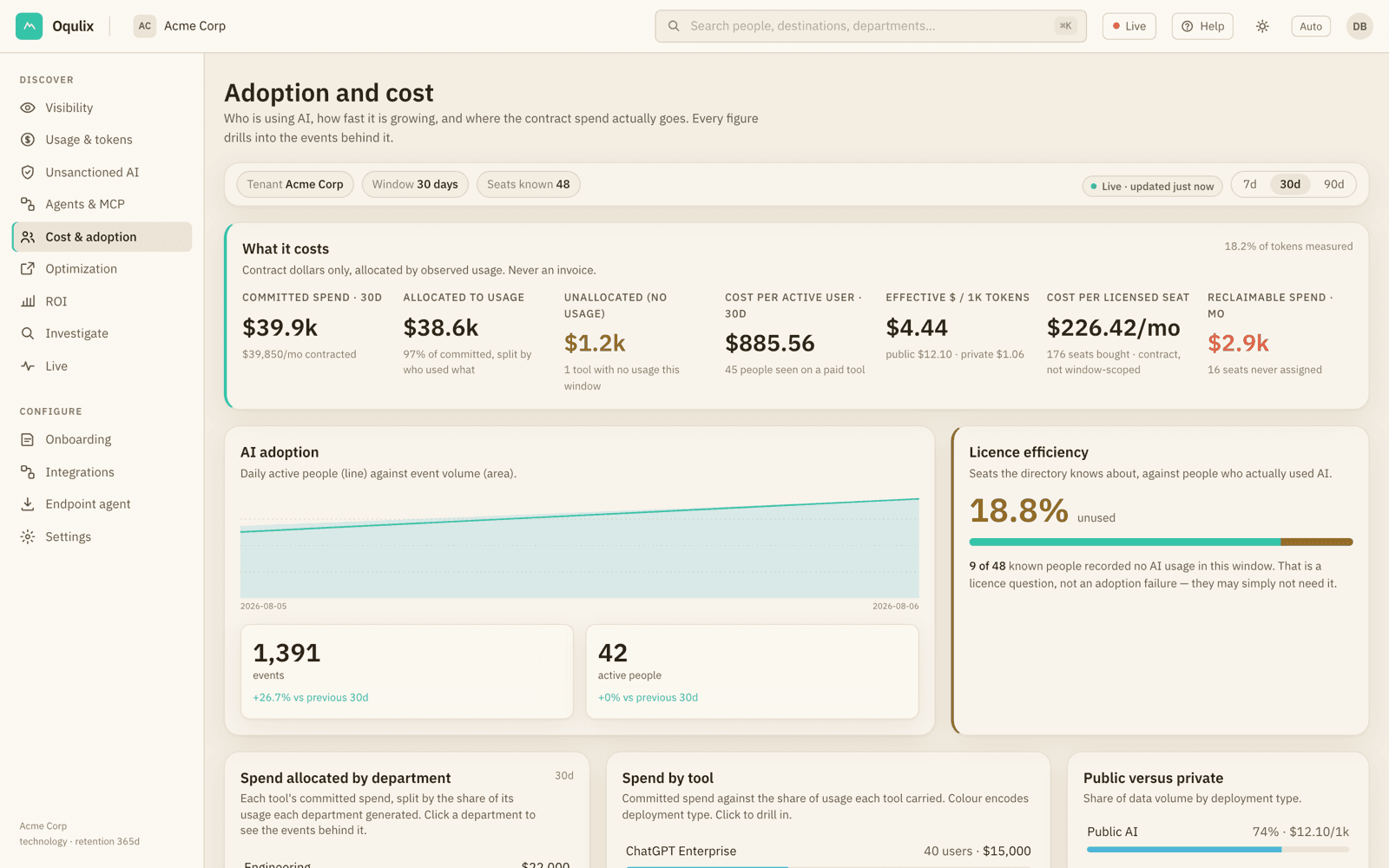
AI spend that maps to people.

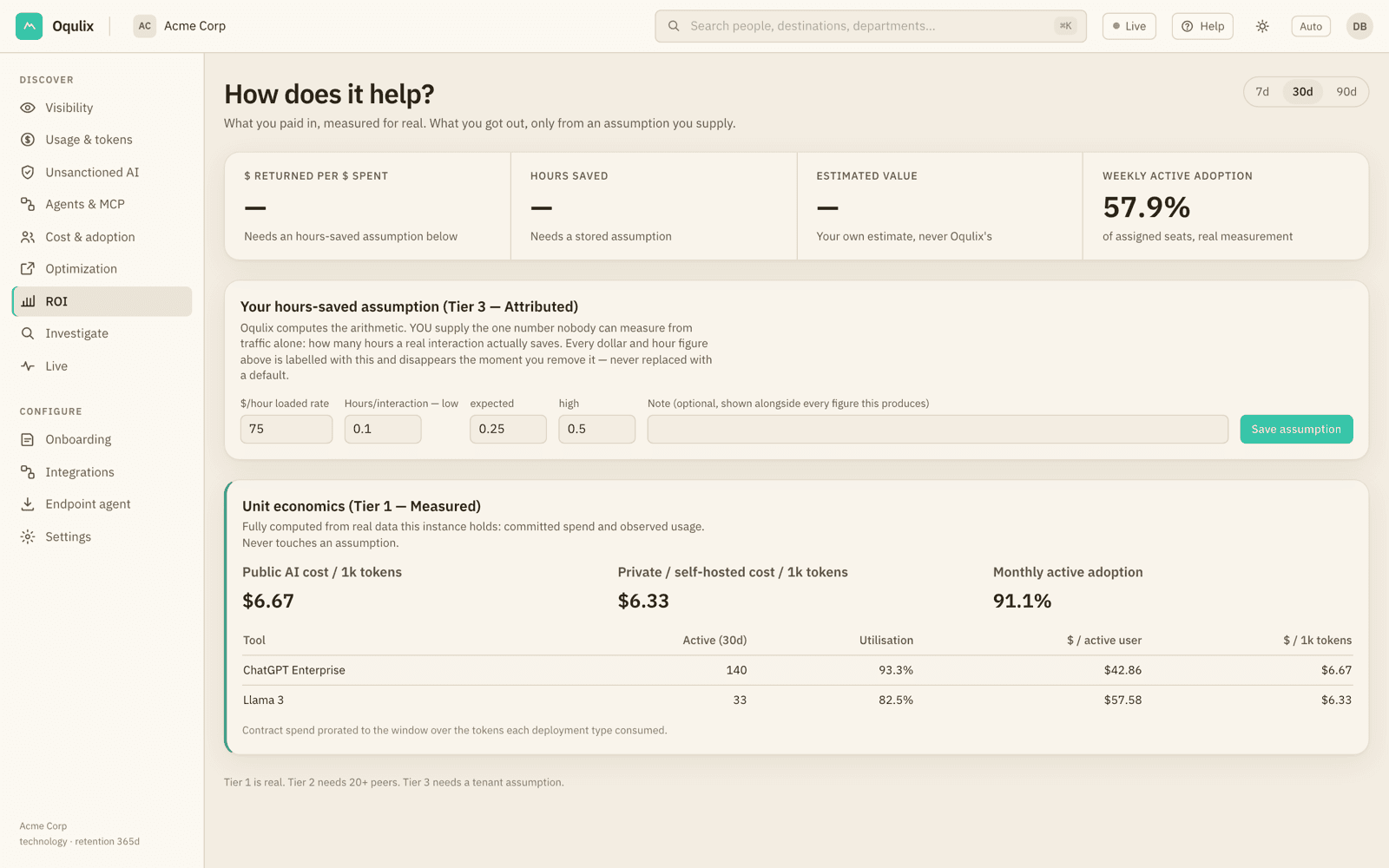
Your contract dollars are allocated across departments and tools by observed usage. Oqulix never invents list prices. You can see seats nobody uses, tools that overlap, and ROI measured on your own assumptions.

  • Committed vs. allocated vs. idle spend
  • Reclaimable seats, with a stated confidence
  • ROI tiers that show their working
The Cost page: committed spend, spend allocated to usage, unallocated spend, cost per active user and reclaimable spend.

Shelfware check

How much of your AI contract is sitting idle?

Enter your own tools, seats and prices. The arithmetic runs in your browser and nothing is sent unless you ask for the breakdown. The rows start with example figures; replace them with yours.

Your AI tools
ToolSeats$ / seat / moActive usersRemove
Idle spend / year–
Contracted / month
–
Idle / month
–
Idle seats
–
Utilisation
–

    This calculator relies on your estimate of who is active. Oqulix measures it from observed traffic instead, and reports unused seats with a stated confidence.

    Where it fits

    Built to sit on top of your stack, not replace it.

    CapabilityDLP aloneCASB / SSEOqulix + your DLP
    Detects sensitive data leavingYes: Its core jobYes: For sanctioned SaaSYes: Builds on your DLP's detections
    Names the AI tool, model and deployment typeNo: A host or app at bestPartly: App-levelYes: Public, self-hosted or agentic, per event
    Sees agent and MCP tool callsNo: Not in scopeNo: Not in scopeYes: Via the MCP gateway
    Sees internal model trafficNo: Not in scopePartly: Only if it's routed throughYes: Gateways and OpenTelemetry
    Tokens and cost per person and modelNo: —No: —Yes: Exact, from gateways and vendor usage APIs
    Allocates AI contract spend by departmentNo: —No: —Yes: From real usage, never list prices
    Keeps raw prompt text out of the vendor's cloudPartly: Varies by productPartly: Often inspected inlineYes: Metadata only by default

    Generalisations about each category; individual products vary. Oqulix works with your DLP rather than replacing it.

    Privacy by architecture

    Metadata leaves. Content doesn't.

    A monitoring product must not become the next leak. These boundaries are enforced in code and covered by tests.

    Sent to Oqulix

    • Destination & deployment type
    • Data class label & confidence
    • Size and token counts
    • Sanctioned or not, from your list
    • Who & which department

    Never sent by default

    • The prompt itself
    • Files and pasted text
    • Model responses
    • Screens and keystrokes
    • Non-AI traffic

    Classified on the device

    The agent and the gateways classify locally. Only the label, its confidence and the sizes are sent.

    Device keys can only write

    An enrolled agent's key can submit events and nothing else. It cannot read the dashboard or change your tenant's settings.

    Content mode is opt-in

    Content is stored only for a tenant that signs a content addendum and switches it on. It is encrypted under its own key, purged on your retention schedule, and every read is audited.

    Append-only audit

    Every admin action and every read of stored content is written to an append-only log. The application role can insert into it, never update or delete.

    Built for every seat

    One source of truth, three conversations.

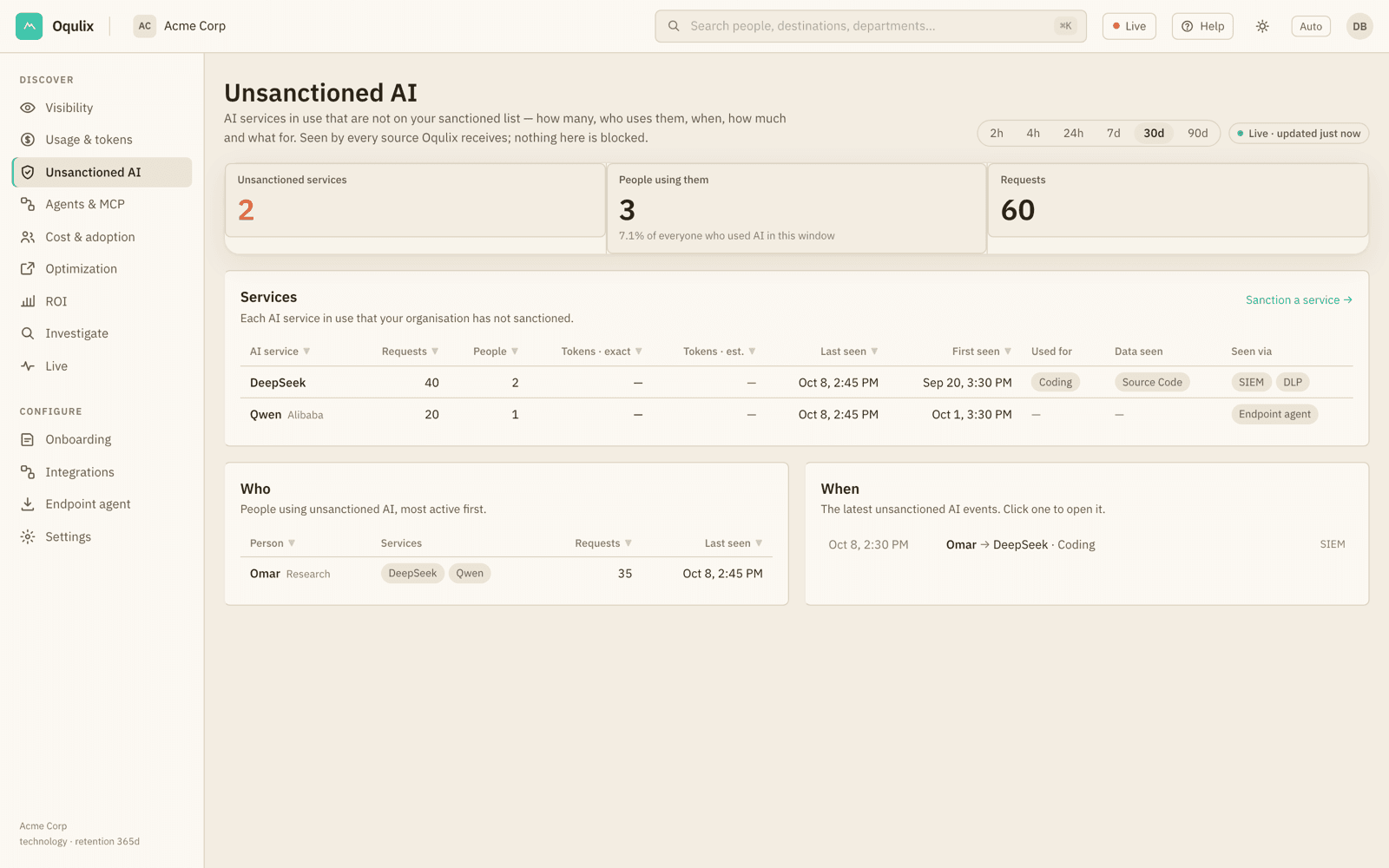
    Know which AI is in use, and where sensitive data goes.

    • Unsanctioned AI: which tools, who, when and for what
    • Data classes on the AI path, as your DLP reported them
    • Every figure drills down to the events behind it
    The Unsanctioned AI page: AI services not on the sanctioned list, who uses them, when, and what for.

    Enterprise-ready

    Isolation and accountability, from the first line.

    01

    Your own identity realm

    Each tenant gets its own OIDC realm. TOTP is required at first sign-in, and your organisation is derived from the realm that signed the token, never from the request.

    02

    Row-level isolation

    Every table is scoped by organisation and enforced by PostgreSQL row-level security, with tests that run as the application role.

    03

    Your own address

    Each customer gets its own address (yourcompany.oqulix.ai), gated at the edge before a request reaches the app.

    04

    Monitoring notice

    Onboarding records HR or Legal's sign-off on the monitoring notice, so collection starts on a documented basis.

    05

    Data localisation

    Designed for India's DPDP Act and GDPR. Metadata-only by default keeps personal data out of scope.

    06

    Read-only connections

    DLP and AI-vendor connectors use read-only credentials, stored encrypted and never shown again. Oqulix reports; it does not change your traffic.

    Questions

    What security teams ask first.

    Do you see our prompts?

    No, not by default. Classification happens on the device or at your gateway, and only metadata reaches Oqulix: the destination, a data class label with its confidence, sizes, whether the tool is sanctioned, and who sent it. Raw content is stored only if your organisation signs a content addendum and switches content mode on. It is then encrypted under its own key, purged on your retention schedule, and every read is audited.

    Do we have to replace our DLP?

    No. Oqulix sits on top of the DLP you already run. It ingests its detections, adds the AI context (which tool, which model, sanctioned or not, which department and device) and shows them beside your other AI signals. Enforcement stays with your DLP.

    Which DLPs, gateways and agents are supported?

    FortiDLP is supported today through a streaming connector, and a connector framework covers further DLP vendors. LiteLLM-based LLM and MCP gateways, OpenTelemetry GenAI spans from internal model stacks, a Windows endpoint agent, and the AI vendors' own usage APIs (Claude, OpenAI, Amazon Bedrock, Azure OpenAI and Google Vertex AI) are all supported. Firewall telemetry, for unmanaged and BYOD devices with no agent, is coming next.

    Where is our data stored?

    Every tenant is isolated by PostgreSQL row-level security and its own identity realm. The design is built around India's DPDP Act and GDPR: because only metadata leaves by default, very little personal data is processed at all. Ask us about hosting region during your demo.

    How long does deployment take?

    Connecting a DLP or pointing a gateway at Oqulix is a configuration change, not a project, and the first events appear once traffic flows. Onboarding asks HR or Legal to sign the monitoring notice first, and we recommend doing that before connecting anything.

    Can Oqulix block traffic?

    No. Oqulix is a visibility layer: it observes and reports, and it does not block, redact or change anything. Enforcement stays with your DLP and the controls you already run.

    Can we see token usage and cost for Claude and OpenAI?

    Yes. Connect the vendor's admin usage API with a read-only key. Tokens appear within about a minute of showing in the vendor's console; billed cost appears once the vendor closes the day, and is never estimated. Amazon Bedrock, Azure OpenAI and Google Vertex AI connect the same way.

    How is one customer kept apart from another?

    Each tenant has its own identity realm. Your organisation is derived from which realm signed your token, never from anything the client sends, and every query is constrained by row-level security. Device keys can only submit events; they can't read the dashboard.
    Request a demo

    See your own AI egress, on your own traffic.

    A 30-minute walkthrough with the team that builds Oqulix, then a pilot on your own traffic.

    • Connect FortiDLP or a gateway in the pilot. Nothing to rip out.
    • Metadata only by default. Your prompts stay with you.
    • An isolated tenant at your own address from day one.

    We use these details only to reply to you. Privacy notice.